White Label App - October 2025
28 October 2025
click here for past feature updates
Loyalty
Support Redemption of Loyalty Currency
This signifies the closure of a significant gap between the physical and digital ordering experience, by allowing guests to redeem available Loyalty currency when placing an order via White Label App. More information on how this should be configured will be provided in a guide added to the Knowledge Base in the near future.

Loyalty
Support Redemption of Rewards with a Points Cost
As with Currency Redemption, this signifies the closure of a significant gap between the physical and digital ordering experience. Guests are now able to redeem Loyalty rewards with a points cost when placing an order via White Label App. Rewards will be available in the basket if the user has a sufficient points balance, and once redeemed, the points will be deducted from that balance.
Other Features & Information
| Feature | Description |
|---|---|
| iOS 26 Support |
Ability to support iOS 26.(NB: Liquid Glass UI support will follow in a later version) |
Past Feature Updates
Product Images
Fade Images for Out of Stock Products
Improves the user experience when browsing menus by fading the images for products that are unavailable or out of stock. Previously the images would show as normal, potentially creating confusion for users as it was not as obvious that the product couldn't be added to a basket.
Product Images
Add Product Images to Quantity Selector
Improves the look and feel when browsing menus and brings parity with Web Ordering by displaying the product image in a banner format when showing the quantity selector.
Other Features & Information
| Feature | Description |
|---|---|
| Error support for unverified users and vaulted cards |
Provide an appropriate error message for scenarios when an unverified user attempts to store their card details. |
Allergens
Display of Allergen Banner in Menus
Building on the iOrder 2.61 release, Web Ordering now has the ability to consume and display Allergen Banners to guests. If enabled in App Manager, the banner will appear at the top of all menus (showing configurable text per Order Mode).
Tips
Enable Display of Tip Based on Order Mode
Provides for more flexibility in the Guest Ordering journey by giving the ability to determine whether tip option is available to guests at order mode level. This allows customers to show the tip option in an Order & Pay journey whilst hiding it in a Click & Collect journey.
Loyalty
Ability to Redeem Buy X get Y Rewards
Closing an important gap between digital and physical ordering, Guest Ordering users can now redeem Buy X get Y rewards (Stamp Cards) as part of their digital ordering journey.
Security
Improved 'Unified Link' Password Reset Journey
Making the process of Guest Ordering users resetting their passwords smoother and more secure by introducing a unified password reset link. Configured via iOrder Platform's Support Manager, this will include a link in the password reset email taking the user to a dedicated password reset page in either White Label App or Web Ordering, depending on what they have installed on their device.
Loyalty
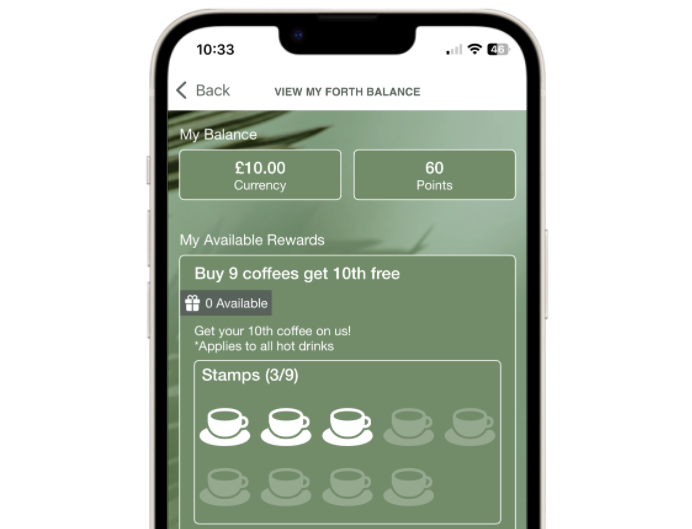
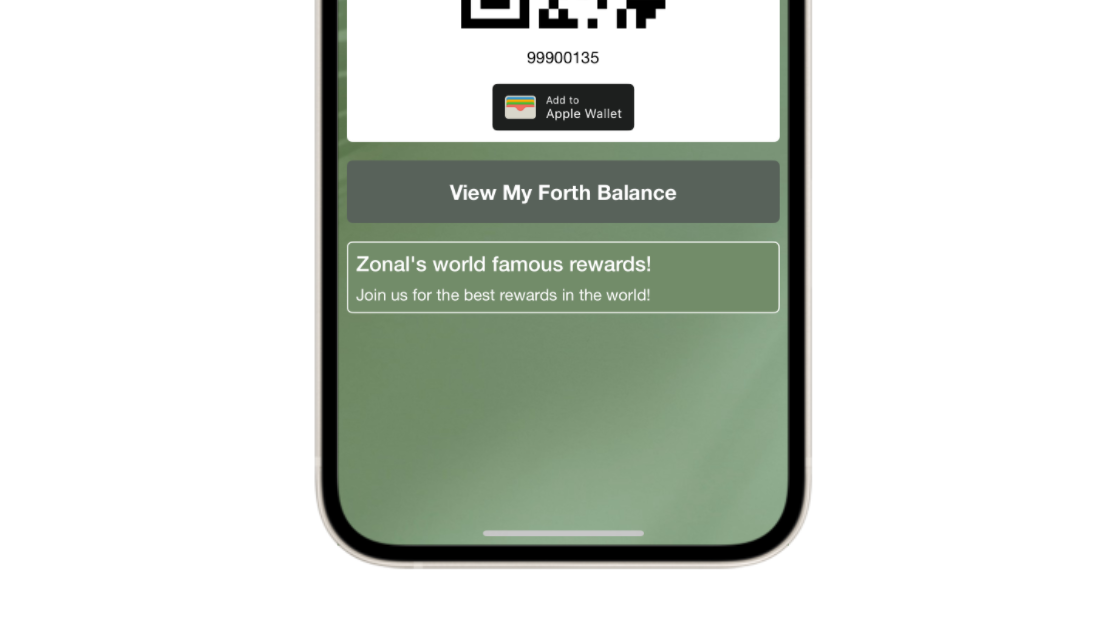
Updated Balance Screen
Customers will now be able to share a new balance screen with an updated look and feel to guests, including the following additions to display:
-
Stamp Cards, with current stamp balance, in App
-
Multiple balances
-
Current Tier that the guest is in
-
Program information configured in Loyalty
-
Terms & Conditions link added to rewards
Loyalty
Add to Wallet Button
Make users' lives much easier by giving them the ability to add their Loyalty Card to their Apple or Google Wallet directly from the White Label App. Once the configuration is set up in Pass Creator, Loyalty and iOrder, the add to wallet button will be visible for users in the 'My Loyalty Card' section of the app, allowing them to add their card to their device wallet in a few clicks.
Images
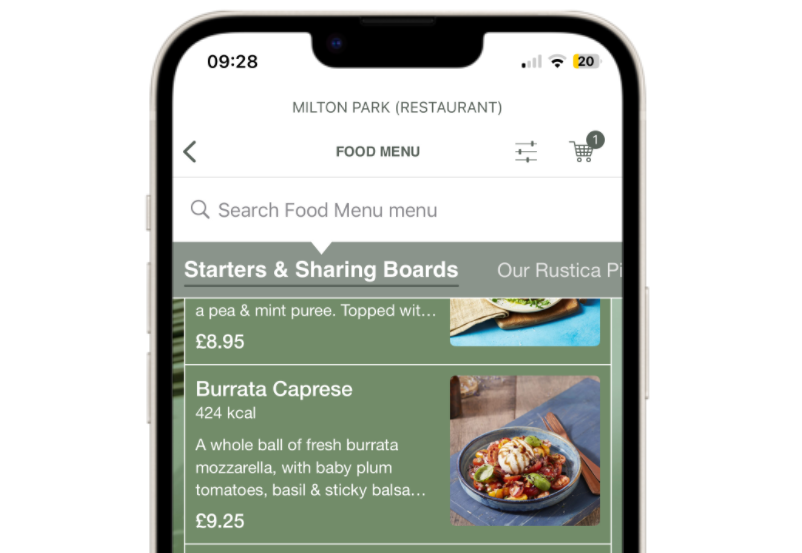
Thumbnail Images in Menus
When a guest is browsing a menu the item cards have been updated to handle the presentation of items both with and without images.
This improved user experience enables configuration of items in a menu to highlight key items with images.
To enhance the look and feel of the menu, product descriptions that exceed three lines are now trimmed (as shown on the first two products in the image). This improvement refines the appearance of the item card especially when images are included. Guests can still view the full description by tapping on the product to open the portion selector.
Loyalty
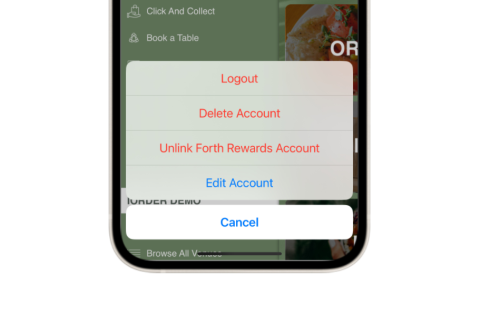
'Unlink Loyalty Card' Icon (changed to text)
The October 2024 release of the White Label App introduced a feature allowing guests to unlink a loyalty card. This update replaces the location of this action to the guest account menu and replacing the icon with text, improving readability and making the action clearer for guests.
Ordering
'At Table' Deep Link Journey
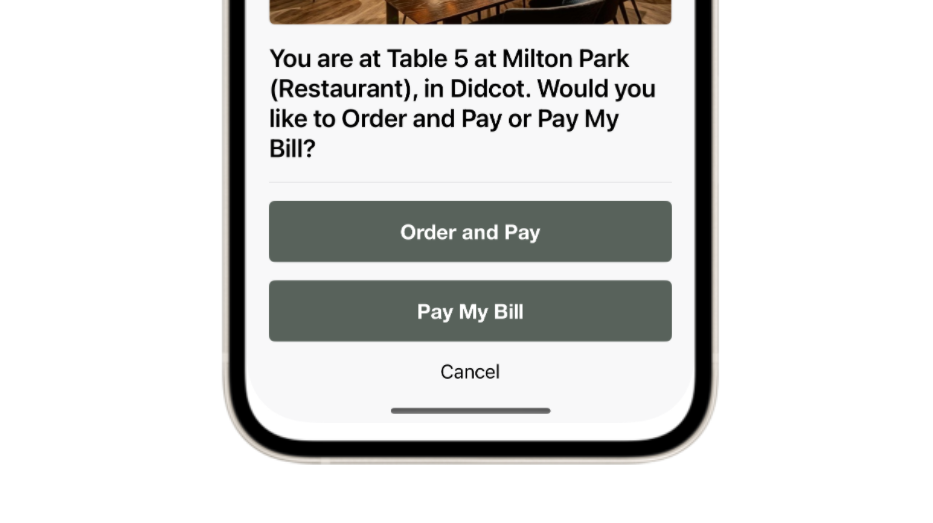
Since the updated Pay My Bill journeys were introduced last year, we have recognised that there was a gap in our offering in respect of customers who wanted to offer an Order & Pay or Pay My Bill journey from the same table without the need for a member of staff to print off a receipt with the Pay My Bill QR code included.
Our new 'At Table' deep link journey provides customers with a solution for this, introducing the ability to have one QR code on the table that, when scanned, allows guests to choose between the following options:
-
Order & Pay, where if selected the guest jumps straight into their ordering journey without having to worry about selecting their table; and
-
Pay My Bill, where if selected the guest is taken directly to their bill and can make a payment in just a few taps with no support needed from a member of staff
This represents an incredible solution for high traffic, high turnaround venues, provided guests a seamless experience whilst maximising efficiency for customers
Images
Alt Text
Earlier in the year we introduced the ability to add Alt text to images in iOrder Platform and this version of the White Label App now supports this. This represents a great improvement in terms of the App's accessibility as it now allows guests using screen readers to consume the alt text added to images shown in the App and allow those guests to fully experience the screens within the ordering journey.
General Update
Updated Credit Card Provider Logos
This is a small but important change, ensuring that the App displays the latest logo for credit card providers in the My Payment Methods screen.
Menus
Portion Visibility within Menus
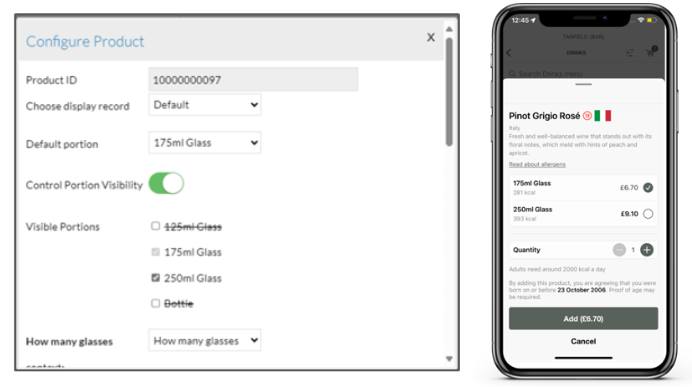
iOrder platform introduced in 2.52 the flexibility to add a product to a menu and select which portions guests can order. For example, a product like 'White Wine' with portions such as '125ml glass,' '250ml glass,' and 'Bottle' can be fully available on an Order & Pay menu, while only the 'Bottle' portion can be offered on a Click & Collect menu.
White label app now respects this configuration within the menu ensuring a tailored ordering experience that meets specific needs of your operation.
Loyalty
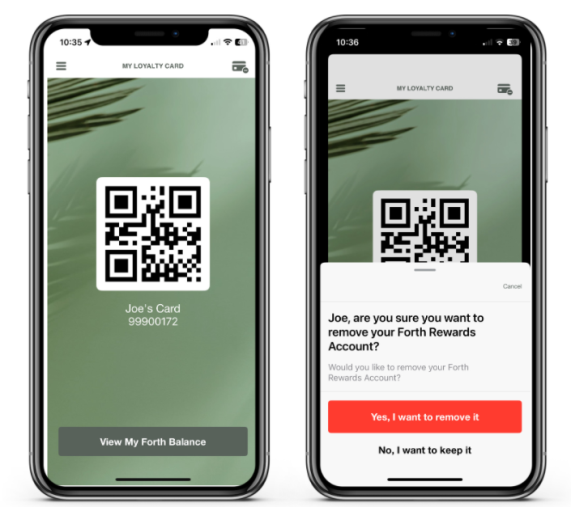
Unlink Loyalty Card
We now support association and auto-enrollment simultaneously in the app, allowing users to easily unlink their loyalty account when needed. For example, staff members transitioning to a guest program can seamlessly remove their staff cards and sign up as guests.
To facilitate this, we've introduced an 'Unlink Card' button in the top right corner of the 'My Loyalty Card' screen. Additionally, we've streamlined navigation by removing the 'View My Account' button, as all account actions and information are accessible through the 'Edit Account' option in the rear menu.
Payments
Part Payment for Pay My Bill
Splitting the bill is now easier than ever with Web Ordering and the White Label App. Guests can quickly view their bill by scanning a QR code and choose to:
-
Pay the entire balance
-
Enter a custom amount
-
Split the total evenly
They can then add a tip (if enabled), complete the payment, and receive an email receipt—making the checkout process smooth and hassle-free.
Loyalty
Add Terms & Conditions to Rewards
Organisations can now easily provide important information to guests by adding Terms & Conditions links to rewards in the White Label App. This extends the existing functionality from the loyalty balance widget, ensuring seamless access to relevant details.
Venues
Favourite Venue Prompt Behaviour
In the White Label App, guests visiting a venue home screen that isn’t already a favourite will see a prompt to add it to their favourites list. To improve the experience, this prompt now appears only once per day.
Venues
Deep Linking to Venue Home Screen
White Label App now supports deep linking to the venue home screen via QR codes, giving guests the flexibility to choose their preferred order mode or access important information through home screen banners. This expands the existing deep linking capabilities for a more seamless experience.
Other Features & Information
| Feature | Description |
|---|---|
| Mandating HTTPS Traffic |
Ensuring that only the more secure URLs with the HTTPS prefix are supporting in White Label App. |
Loyalty
Updated Loyalty Sign-Up Journey
The Engage domain focuses on seamless product integrations, and this release enhances the connection between White Label App and Loyalty. Now, both auto-enrollment and association can be enabled simultaneously, allowing new iOrder sign-ups to receive a loyalty account while also giving existing loyalty members the option to link their accounts. This provides greater flexibility for organisations with multiple loyalty programs.
A common use case for this feature is a organisation managing two loyalty programs:
-
Program A (Staff Program): Staff members receive assigned loyalty cards after joining the company
-
Program B (Guest Program): Guests can enroll in the program at any time
With this update, staff members in Program A can link their loyalty cards to their iOrder account after signing up, while guests are automatically enrolled in Program B upon account creation.
Allergens
Display an Allergen Prompt to Guests
As more guests choose to use the App or Web Ordering in venues, some customers have expressed concerns that guests with food allergies or intolerances may inadvertently order unsuitable products through these platforms, due to potential cross-contamination or other unforeseen factors.
To address concerns and better support guests with allergies or intolerances, this release takes advance of the enhancements made in the iOrder Platform by introducing an Allergen Prompt at the start of the ordering journey. Guests without allergies or intolerances can easily dismiss the prompt and proceed with their order. However, for guests with allergies, the prompt will restrict online ordering and display a customisable message, directing them to a staff member to ensure they can place a safe order.
Other Features & Information
| Feature | Description |
|---|---|
| X (Formerly Twitter) Logo Update |
With this release we have updated White Label App to display the correct logo for X. |
Ordering
Unified Ordering - Delivery to Location
This release builds on the development from March, extending the Unified Ordering vision and ability to create & implement Universal Links for both Apple and Android device to a new order mode. This means that customers using Delivery to Location who have both Web Ordering and White Label App can present guests with a QR Code, allowing them to Deep Link to a specific point in the ordering journey (with venue, sales area and even delivery location, introduced in the April Web Ordering release, pre-selected depending on the URL schema used).
When the QR code is scanned, users with White Label App installed will follow a deep link to the requisite part of the ordering journey in their App and users without the White Label App installed will be directed to the same part of their ordering journey in Web Ordering.
Ordering
Unified Ordering - Order & Pay
This release represents a huge development for the Unified Ordering vision as White Label App now supports the ability to create & implement Universal Links for both Apple and Android devices. This means that customers using Order & Pay who have both Web Ordering and White Label App can present guests with a QR Code, allowing them to Deep Link to a specific point in the ordering journey (with venue, sales area and even table pre-selected depending on the URL schema used).
When the QR code is scanned, users with White Label App installed will follow a deep link to the requisite part of the ordering journey in their App (matching current behaviour) but crucially, users without the White Label App installed will be directed to the same part of their ordering journey in Web Ordering.
App
Encourage / Enforce Guests to update their App
iOrder platform introduced the capability to configure prompts to guests on minimum or recommended app versions.
White Label app now takes advantage of this configuration and enforce the necessary prompts configured.
Payments
Pay My Bill Improvements
Guests using Pay My Bill now enjoy the same sleek design and features, such as the newly introduced in-line basket tipping, providing a seamless experience across all order modes.
To enhance clarity, this release also removes 'top-line instructions'—internal notes added to an Aztec account by staff—which were not intended for guests. This update ensures that only relevant information is shown on the bill, creating a smoother and more intuitive experience for guests.